๐Ÿ”ฅ Featured
Top AI Hosting Wallet for WordPress & WooCommerce โ€” Plugin
โญ ๐Ÿ”ฅ Featured

Top AI Hosting Wallet for WordPress & WooCommerce

๐Ÿ”Œ Plugin

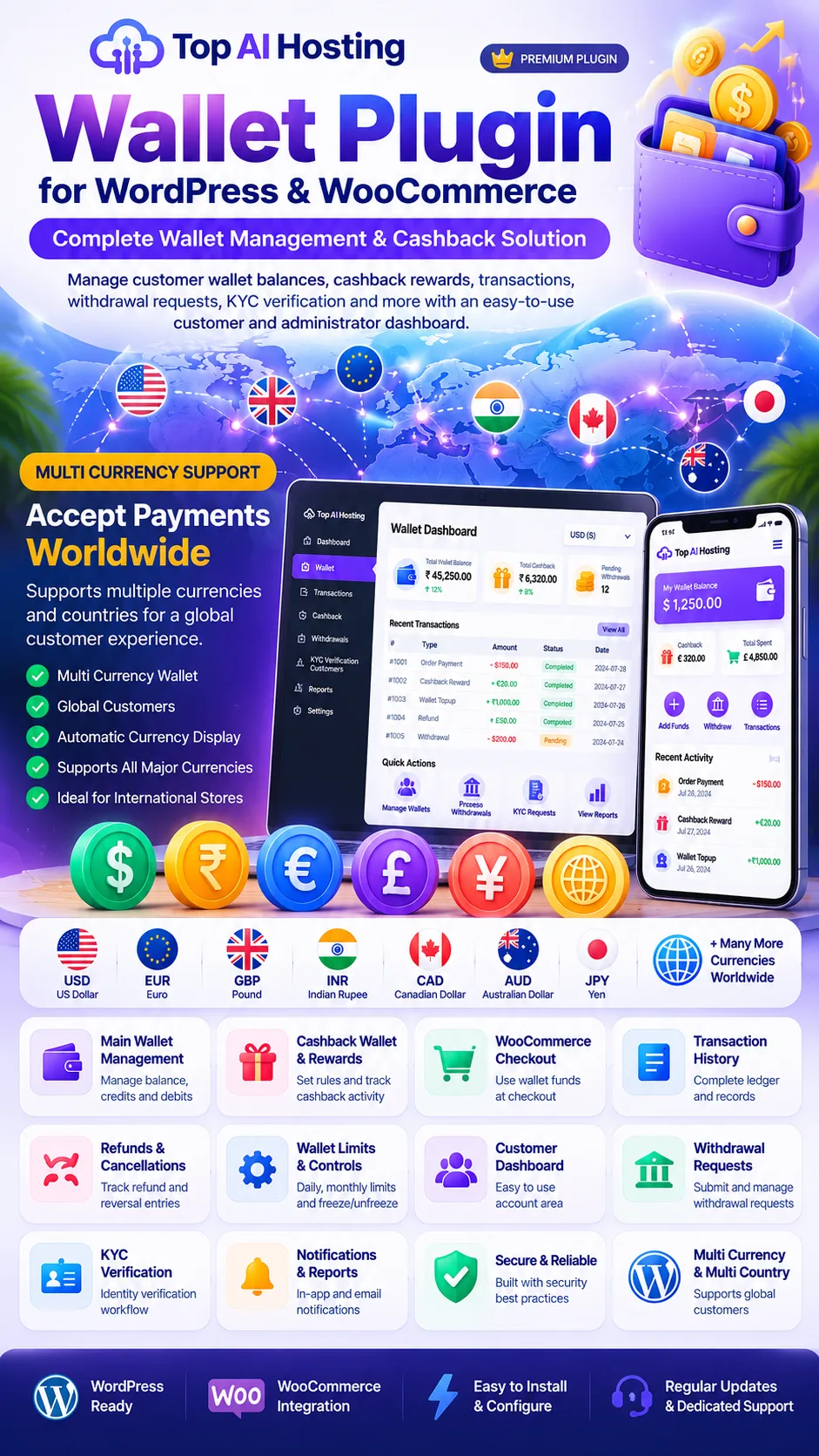
A WordPress and WooCommerce wallet management plugin designed to manage customer wallet balances, cashback rewards, transaction history, supported checkout payments, withdrawal requests and KYC review workflows through customer and administrator dashboards.

โšก
Modern Design
๐Ÿ“ฑ
Fully Responsive
๐Ÿš€
Fast Loading
๐ŸŽจ
Easy Customize
โ‚น427.30 โ‚น1,999.00 Save 79%
  • High Quality Build
  • SEO Optimized
  • 1 Year Free Updates
  • 24/7 Customer Support
  • Easy Installation
  • Money Back Guarantee
๐Ÿ”’ Secure Payment โšก Instant Delivery ๐Ÿ’ฌ 24/7 Support โ†ฉ๏ธ 7-Day Refund

๐Ÿ“‹ Product Specifications

๐Ÿ’ธ

Wallet System

Main Wallet & Cashback Wallet

๐Ÿฆ

Payout Methods

Bank Account, UPI ID

๐Ÿ’ฐ

Withdrawal Requests

Yes

๐Ÿ›ก๏ธ

Admin Approval

Configurable

๐Ÿ“Š

Withdrawal History

Yes

๐Ÿ”Ž

Status Filters

Pending, Approved, Rejected, Cancelled

๐Ÿ””

Email Notifications

Configurable

๐Ÿ“ฅ

Report Export

Excel, PDF (where supported)

๐Ÿ‘ค

Customer Dashboard

WooCommerce My Account

โš™๏ธ

Admin Management

Yes

๐Ÿ“ฑ

Responsive Design

Desktop, Tablet & Mobile

๐Ÿ”

Account Details

Customer-managed bank/UPI information

๐Ÿ”„

Transaction Tracking

Wallet credits, debits & withdrawals

๐Ÿงพ

Demo Data

Included in preview only

๐Ÿ”Œ

Platform

WordPress & WooCommerce

๐Ÿ’ป

Plugin Type

Wallet & Withdrawal Management

๐ŸŒ

Developer

Top AI Hosting

๐Ÿ“ธ Product Screenshots

๐Ÿ” Kisi bhi image pe click karo โ€” full size me zoom karke dekho.
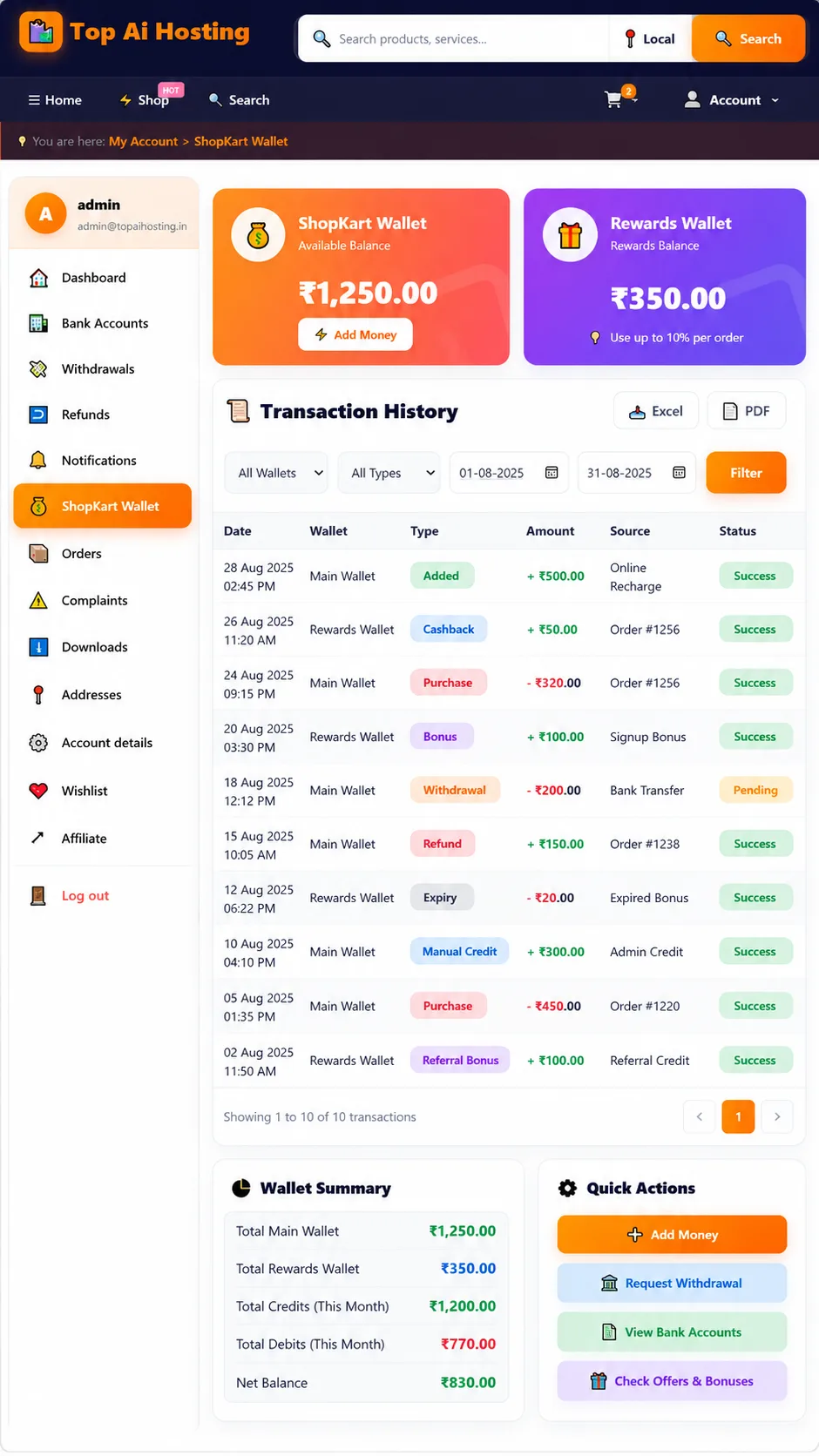
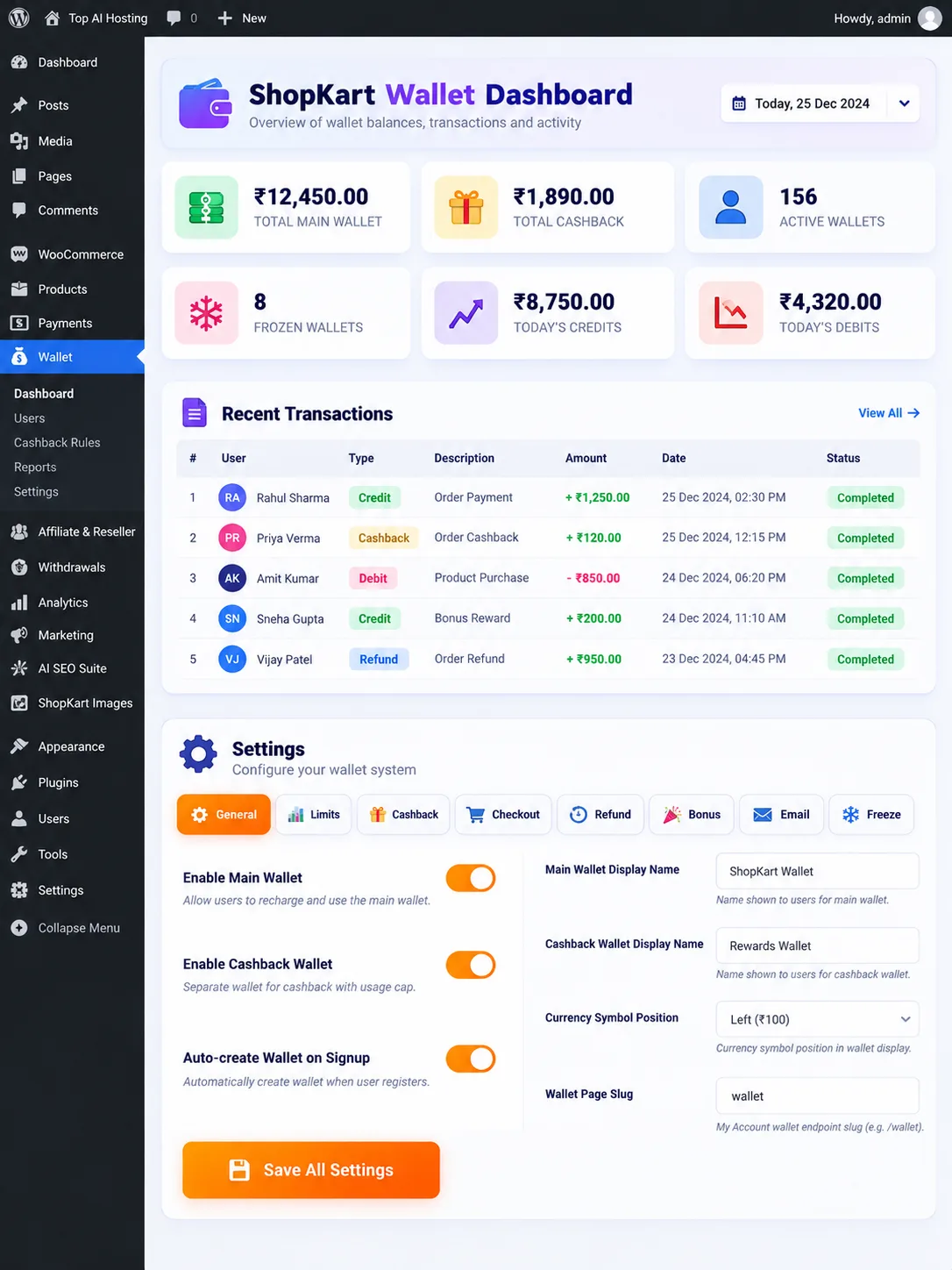
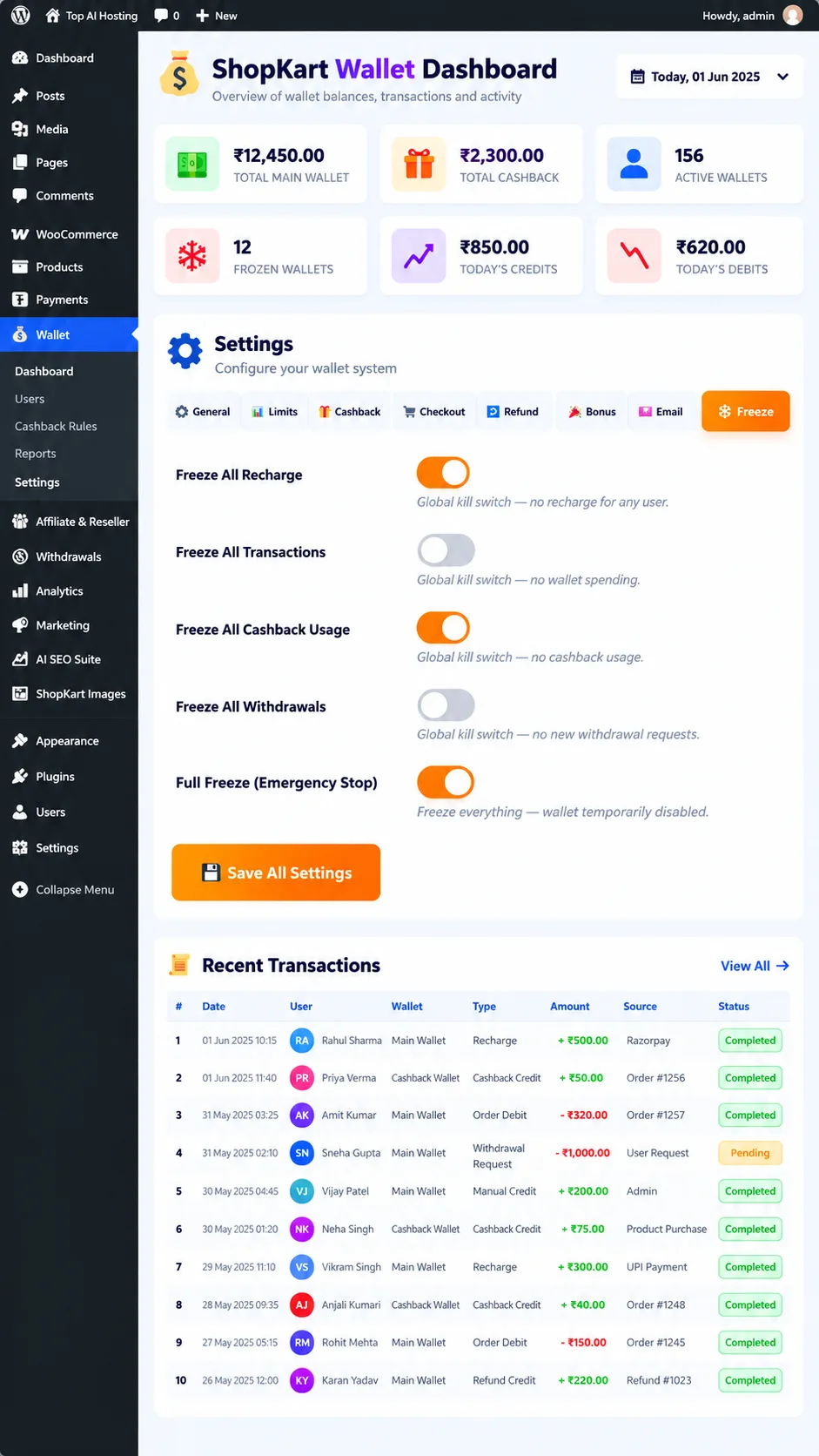
Top AI Hosting Wallet for WordPress & WooCommerce โ€” ShopKart Wallet Dashboard & Financial Overview
ShopKart Wallet Dashboard & Financial Overview
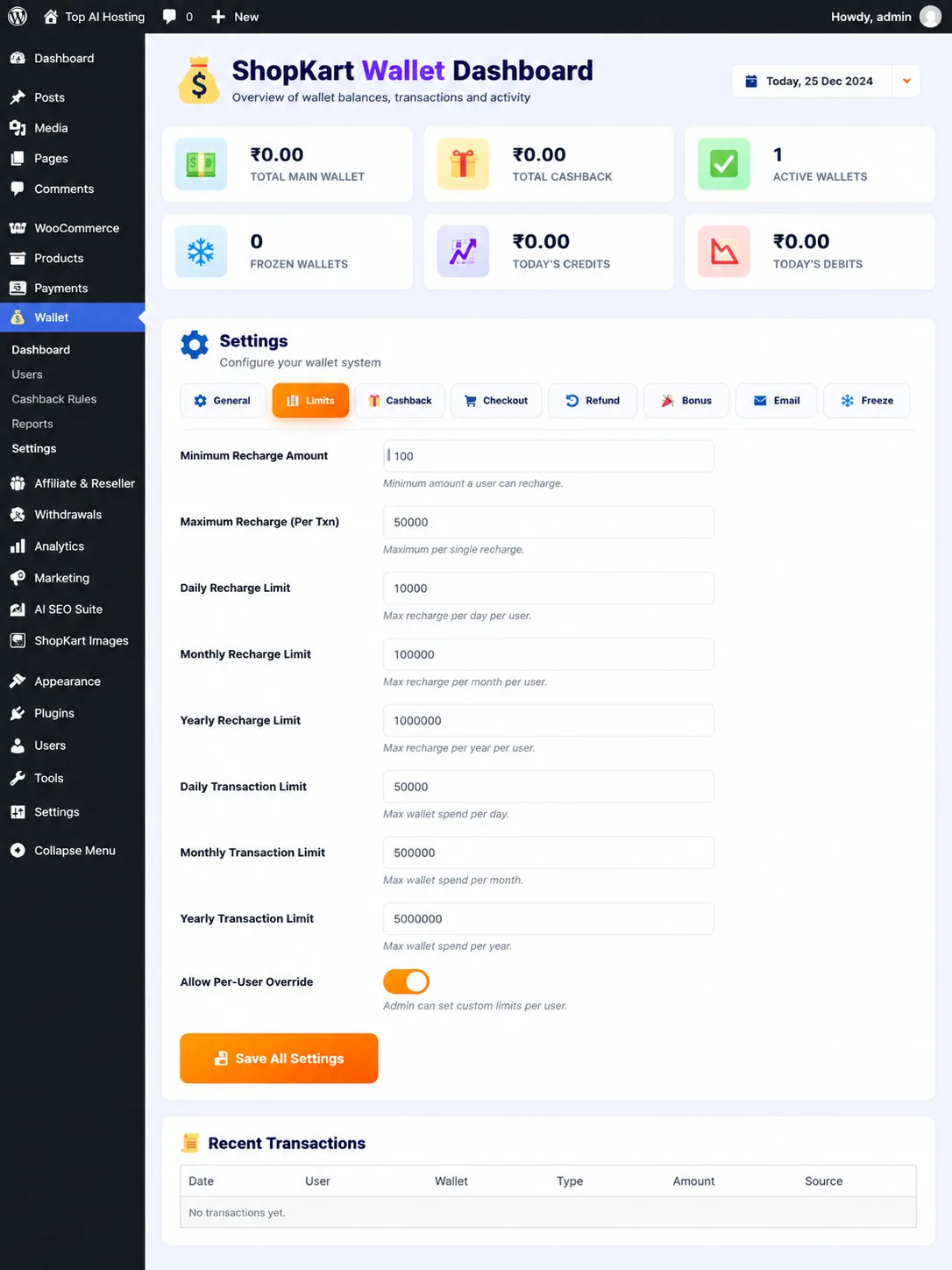
Top AI Hosting Wallet for WordPress & WooCommerce โ€” Wallet Limits & Transaction Control Dashboard
Wallet Limits & Transaction Control Dashboard
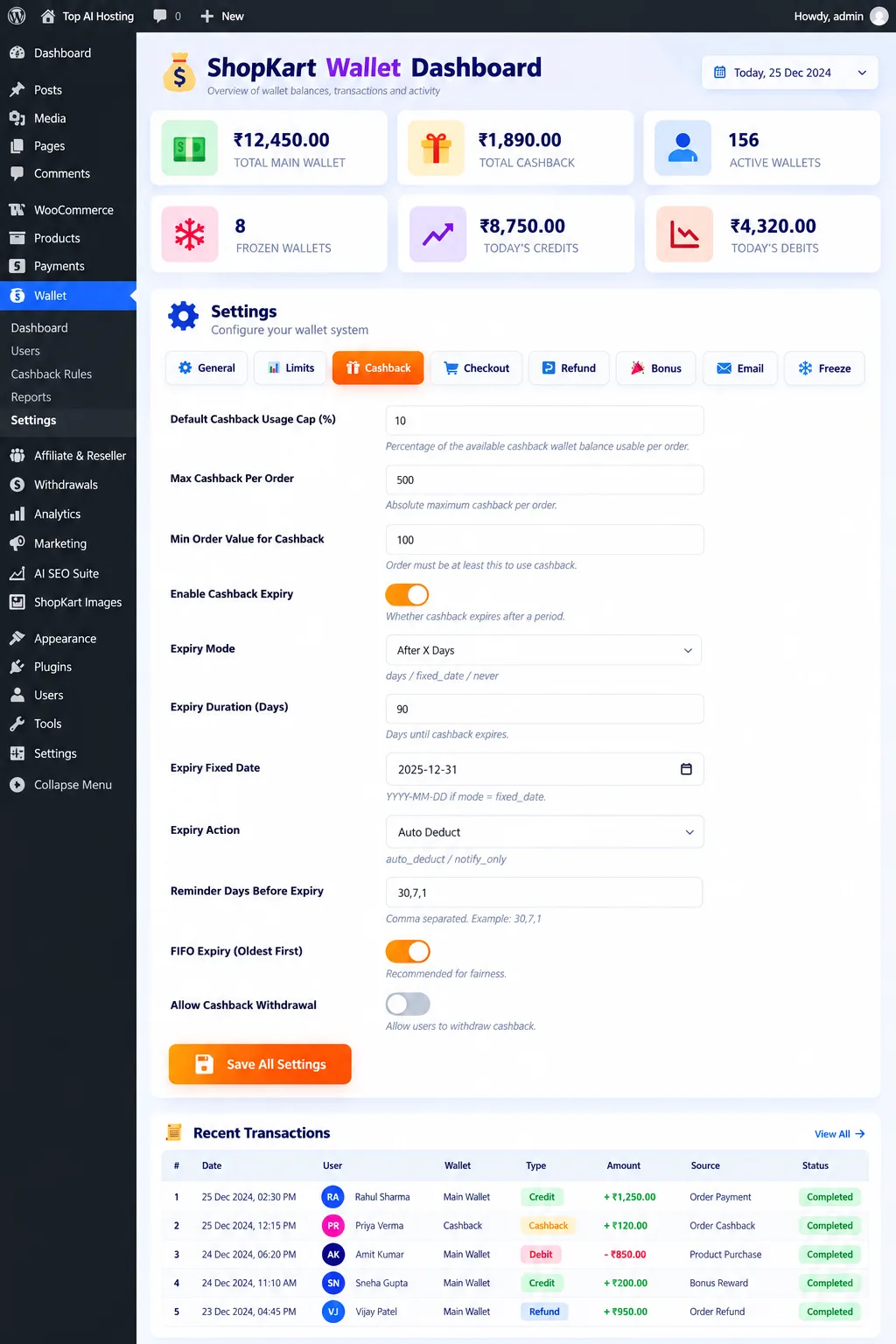
Top AI Hosting Wallet for WordPress & WooCommerce โ€” Advanced Cashback Rules & Expiry Management Dashboard
Advanced Cashback Rules & Expiry Management Dashboard
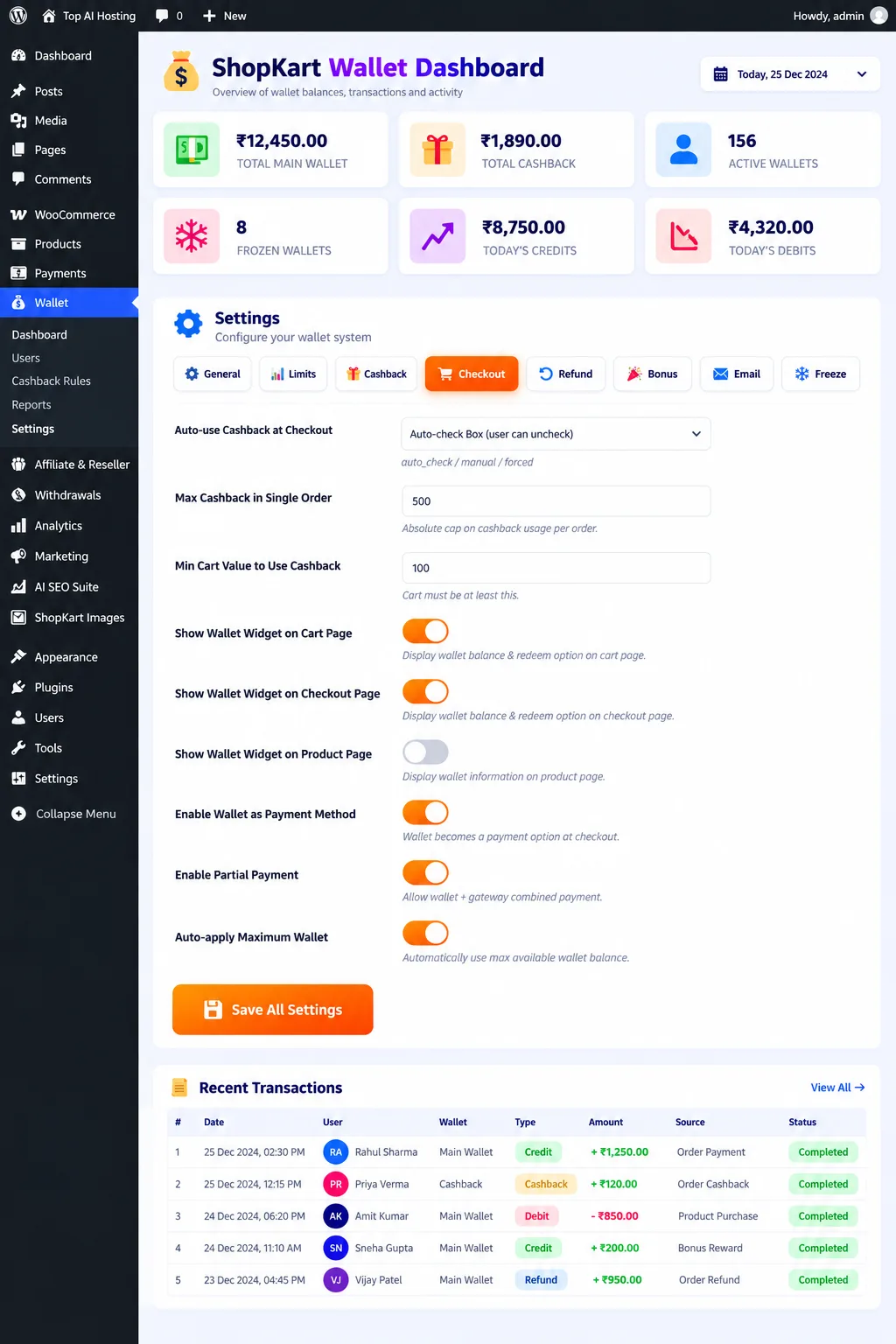
Top AI Hosting Wallet for WordPress & WooCommerce โ€” Smart WooCommerce Wallet Checkout & Partial Payment Settings
Smart WooCommerce Wallet Checkout & Partial Payment Settings
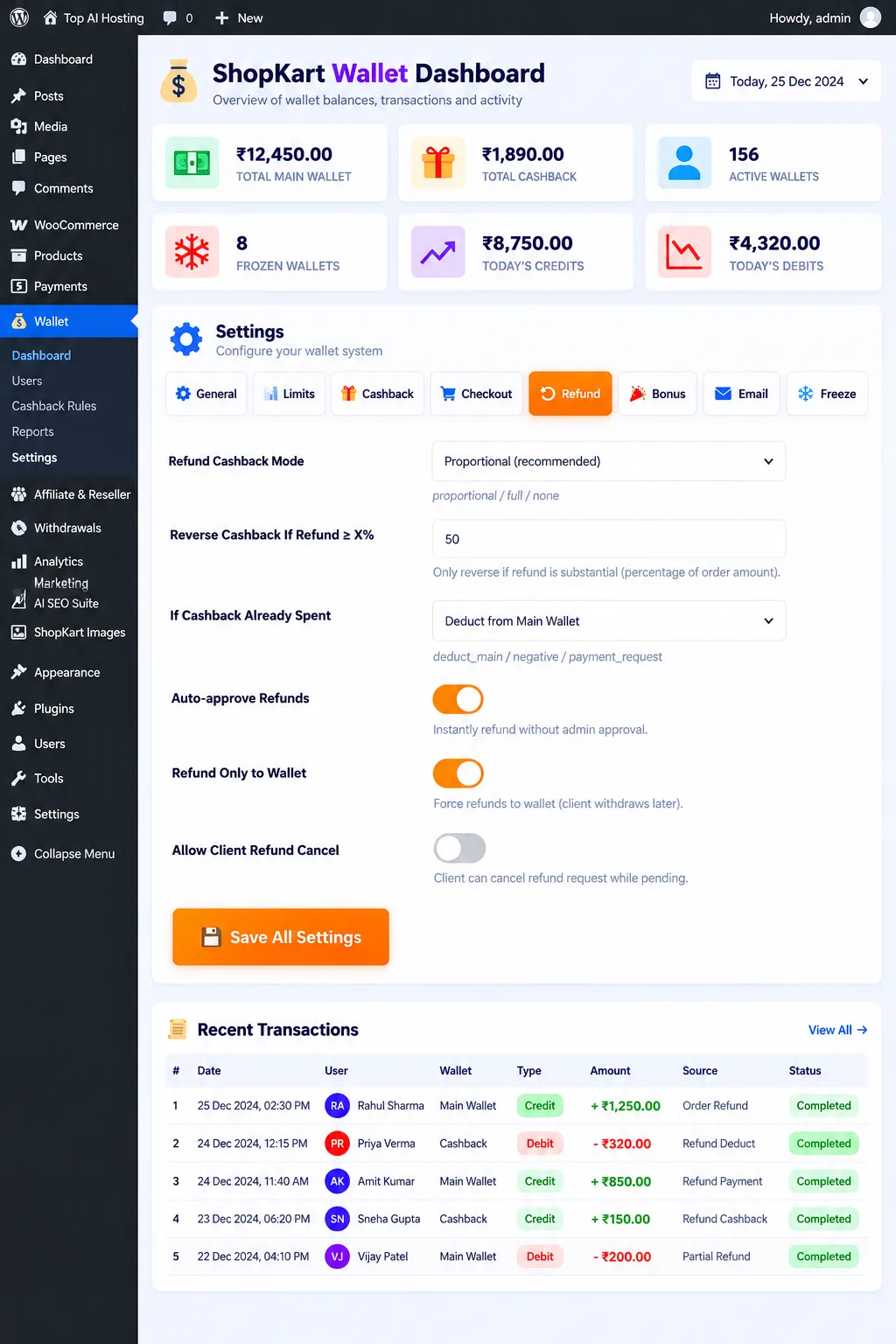
Top AI Hosting Wallet for WordPress & WooCommerce โ€” Smart Wallet Refund Management & Cashback Reversal Settings
Smart Wallet Refund Management & Cashback Reversal Settings
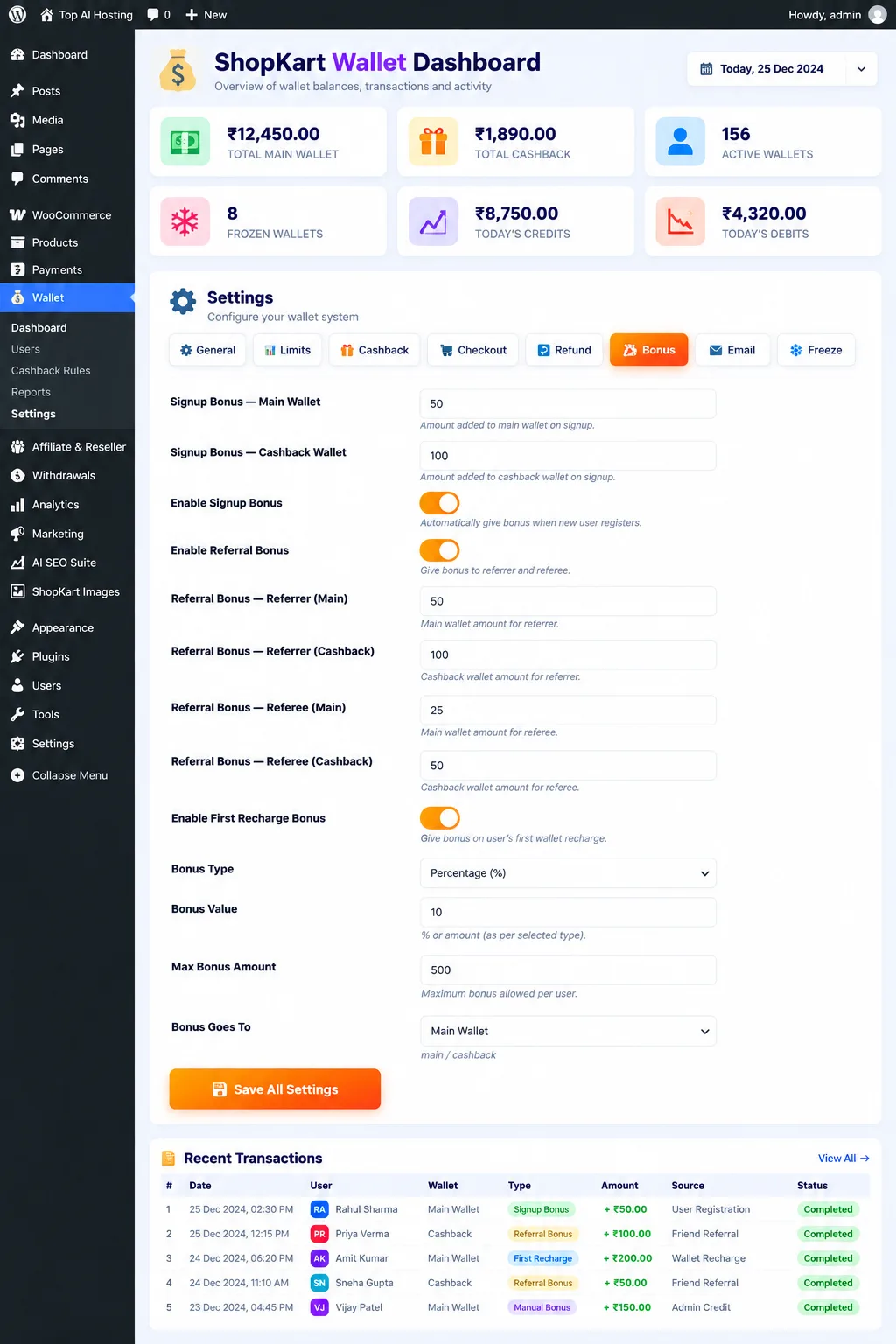
Top AI Hosting Wallet for WordPress & WooCommerce โ€” ๐ŸŽ Smart Wallet Signup, Referral & First Recharge Bonus Management
๐ŸŽ Smart Wallet Signup, Referral & First Recharge Bonus Management
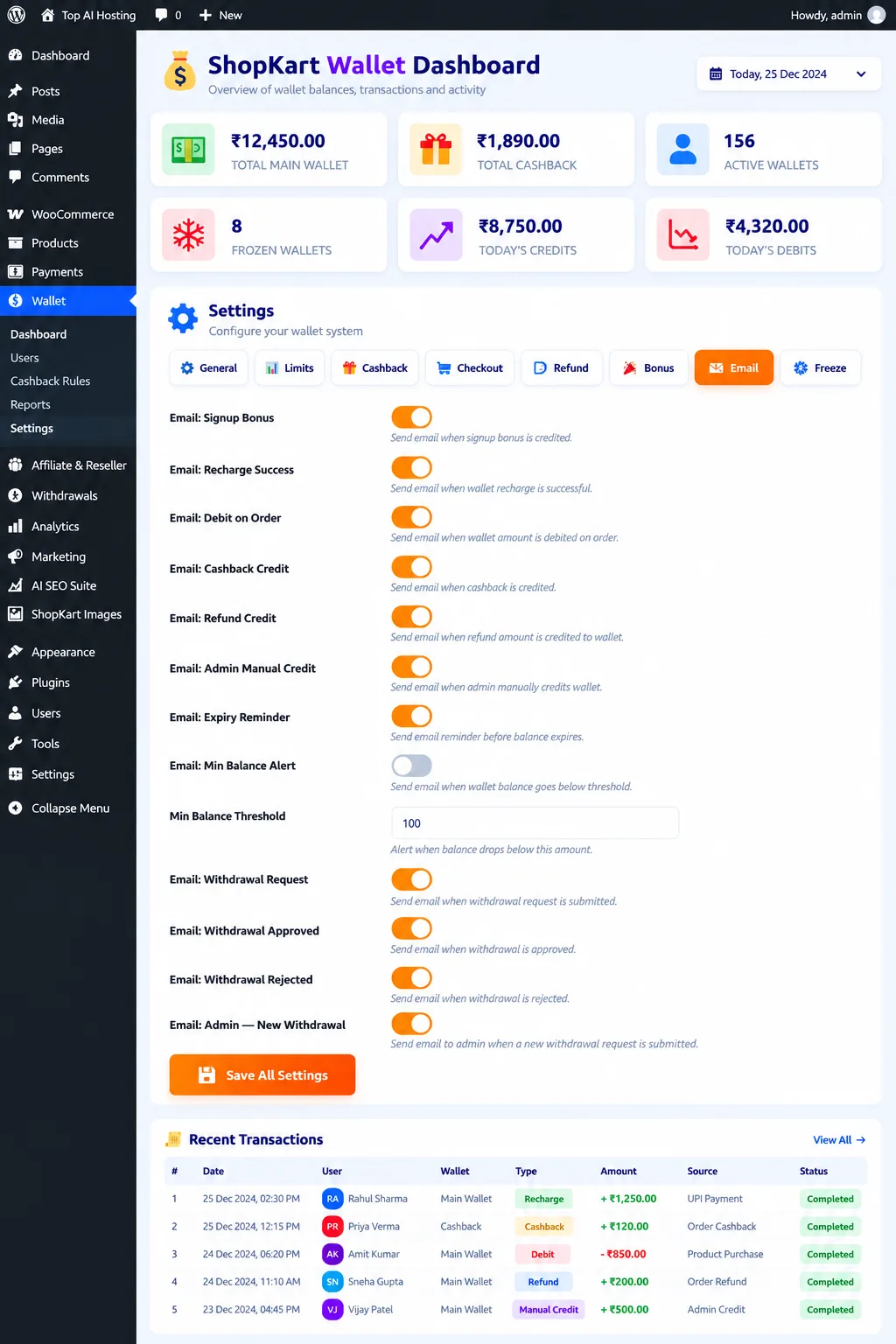
Top AI Hosting Wallet for WordPress & WooCommerce โ€” Smart Wallet Email Notifications & Transaction Activity Dashboard
Smart Wallet Email Notifications & Transaction Activity Dashboard
Top AI Hosting Wallet for WordPress & WooCommerce โ€” ShopKart Wallet โ€“ Smart Wallet, Cashback & Transaction Management for WooCommerce
ShopKart Wallet โ€“ Smart Wallet, Cashback & Transaction Management for WooCommerce
Top AI Hosting Wallet for WordPress & WooCommerce โ€” Top AI Hosting Wallet โ€“ Smart Wallet & Cashback Rewards for WooCommerce
Top AI Hosting Wallet โ€“ Smart Wallet & Cashback Rewards for WooCommerce
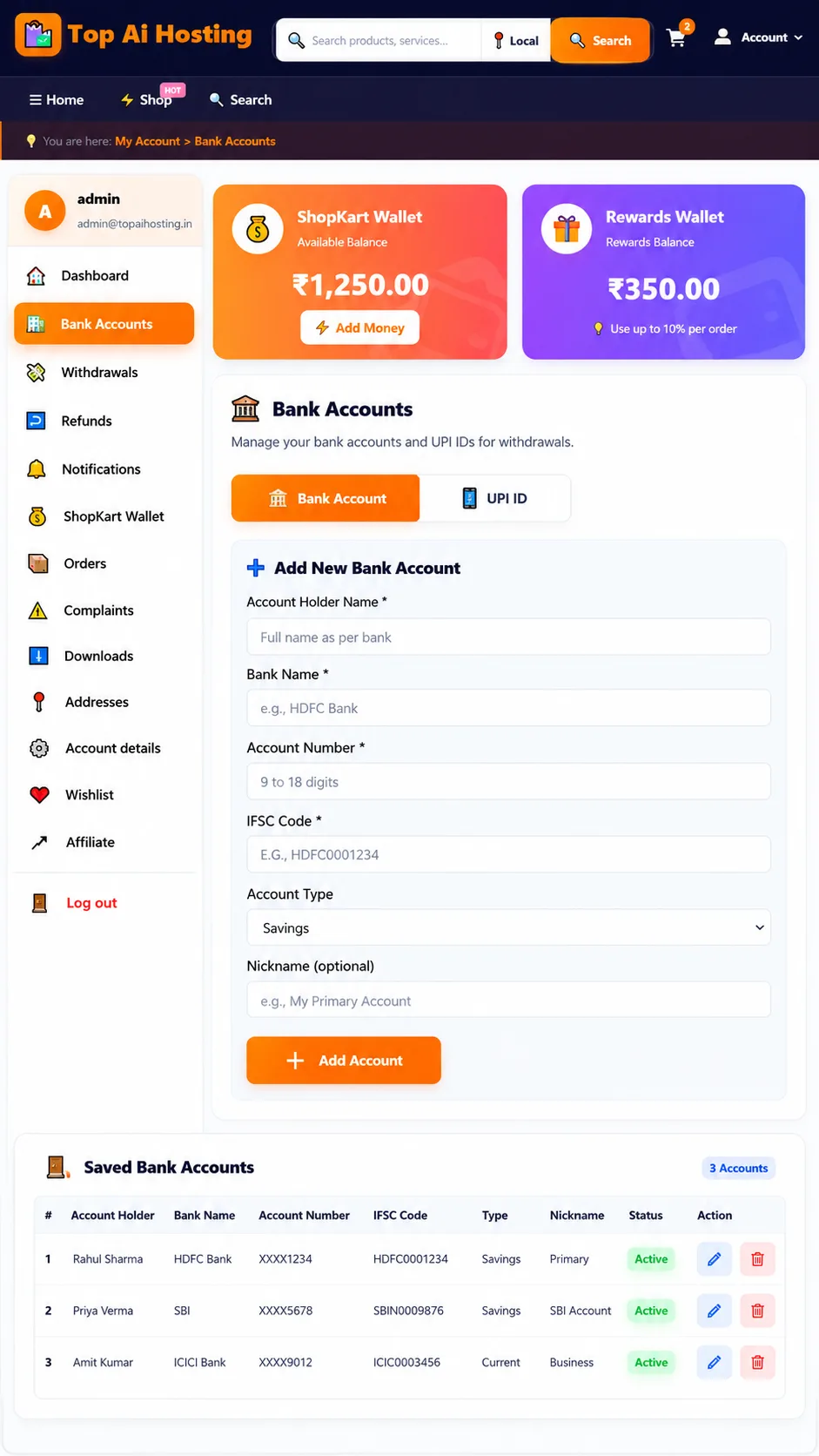
Top AI Hosting Wallet for WordPress & WooCommerce โ€” ๐Ÿฆ Top AI Hosting Bank Accounts โ€“ Secure Withdrawal & UPI Management for WooCommerce
๐Ÿฆ Top AI Hosting Bank Accounts โ€“ Secure Withdrawal & UPI Management for WooCommerce
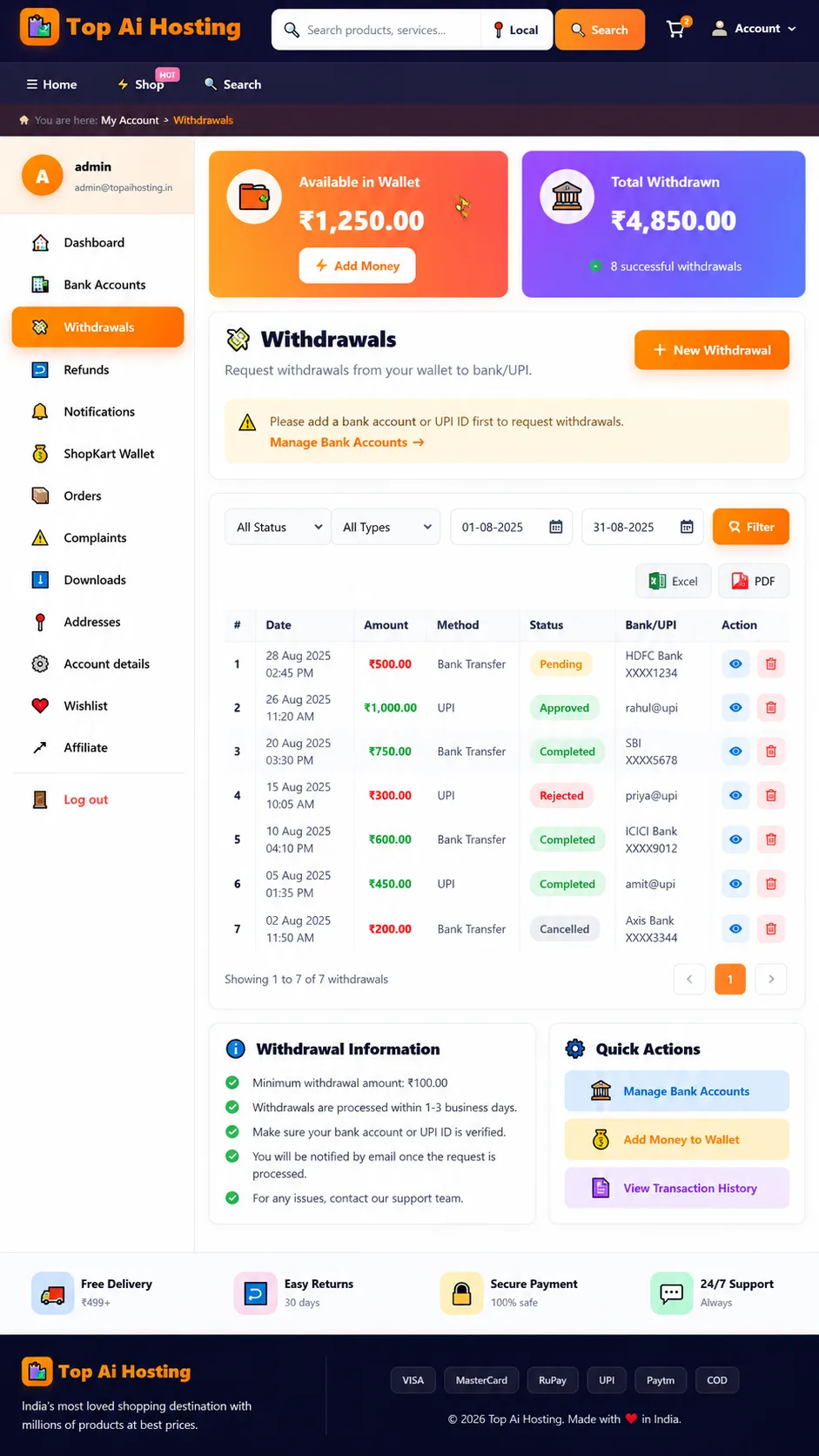
Top AI Hosting Wallet for WordPress & WooCommerce โ€” ๐Ÿ’ธ Top AI Hosting Wallet โ€“ Withdrawals & Payout Management for WordPress
๐Ÿ’ธ Top AI Hosting Wallet โ€“ Withdrawals & Payout Management for WordPress

โœจ Why Choose Top AI Hosting Wallet for WordPress & WooCommerce?

๐ŸŽฏ Theme Highlights

  • Modern & Professional Design
  • Fully Responsive Layout
  • Fast Loading Performance
  • SEO Optimized Code
  • Easy Customization
  • Regular Updates
  • Dedicated Support

๐Ÿ”ฅ Key Features

  • Amazon-style Layout
  • Product Search & Filters
  • Category Navigation
  • Featured Products Section
  • Product Gallery & Slider
  • Video Support (YouTube)
  • Related Products Display
  • Mobile-friendly Design
  • Fast & Lightweight

๐Ÿ“„ Product Page Sections

  • Image Gallery with Thumbnails
  • Product Information Panel
  • Specifications Table
  • Feature Sections (Image + Text)
  • Video Section
  • FAQs Section
  • Related Products
  • Social Share Buttons

๐Ÿ“ Full Description

๐Ÿ’ณ ๐Ÿ’œ ๐Ÿ’ฐ

Top AI Hosting Wallet

Wallet Management & Cashback Solution for WordPress

A centralized wallet experience for WooCommerce stores. Manage wallet balances, cashback rewards, transactions, withdrawal requests and customer wallet activity from one convenient system.

๐Ÿ’ณ Main Wallet ๐ŸŽ Cashback ๐Ÿ›ก๏ธ Security

โœจ Product Overview

Top AI Hosting Wallet for WordPress is designed for businesses using WordPress and WooCommerce that need a convenient way to manage customer wallet activity and supported cashback workflows.

The customer-facing wallet area and administrator controls help organize balances, transactions and related requests in one place. Available features depend on the installed plugin version and configuration.

๐Ÿ’ณ

Main Wallet

Wallet balance and transaction records.

๐ŸŽ

Cashback Wallet

Eligible rewards and cashback tracking.

๐Ÿ›’

WooCommerce

Supported wallet checkout workflows.


๐Ÿ’ณ 1. Main Wallet Management

Give customers a convenient place to review their wallet balance and supported wallet transactions.

๐Ÿ’ฐ
WALLET BALANCE
••••••
Illustrative dashboard graphic

Wallet Features

  • Display available wallet balance.
  • Review supported credits and debits.
  • View transaction amounts and statuses.
  • Track wallet activity through transaction history.
  • Use eligible wallet funds for supported checkout transactions.
  • Review supported administrative adjustments and reversals.

๐ŸŽ 2. Cashback Wallet & Rewards

๐ŸŽ‰ ๐Ÿช™ ๐ŸŽ

Reward Your Customers

The separate Cashback Wallet concept helps distinguish cashback rewards from the Main Wallet and makes eligible reward activity easier to review.

  • Separate cashback transaction records where implemented.
  • Cashback rules for eligible purchases.
  • Product-level cashback configuration where available.
  • Cashback history and associated transaction details.
  • Expiry dates and scheduled expiry processing where supported.
  • Cashback product badges where included in the installed version.

๐Ÿ›’ 3. WooCommerce Checkout Integration

๐Ÿ›๏ธ

Wallet Payments

Eligible customers can use available wallet funds in supported checkout flows.

๐Ÿ’ต โž• ๐Ÿ’ณ

Split Payments

Where implemented, wallet funds may cover part of an order while another supported payment method covers the remainder.

๐Ÿ”Ž

Checkout Validation

Applicable balance, wallet status and transaction restrictions should be validated by the server.


๐Ÿ“Š 4. Transaction History & Ledger

Keep supported wallet activity organized and easier to review.

๐Ÿ“‹ Transaction Overview — Illustrative Example
Transaction
Type
Status
Wallet credit
โž• Credit
Recorded
Order payment
โž– Debit
Recorded
Refund reversal
โ†ฉ Reversal
As applicable
  • Review supported wallet credits and debits.
  • Inspect available transaction references and statuses.
  • Review supported order-related wallet activity.
  • Track refund and reversal records where implemented.

Note: The table above is a design illustration, not live customer transaction data.


โ†ฉ๏ธ 5. Refunds & Order Cancellations

๐Ÿงพ โ†ฉ๏ธ ๐Ÿ’ณ

Supported refund workflows can help keep wallet activity associated with the relevant order and refund record.

  • Track supported refund-related wallet entries.
  • Record applicable reversals.
  • Associate transactions with available order references.
  • Use duplicate-credit safeguards where implemented.

๐Ÿ–ฅ๏ธ 6. Administrator Dashboard

TOP AI HOSTING · WALLET ADMIN

Wallet Control Center

๐Ÿ‘ฅ
Customer Wallets
๐Ÿ“’
Transactions
๐ŸŽ
Cashback
๐Ÿ›ก๏ธ
Wallet Controls

Illustrative design concept — not an actual screenshot of the plugin.

  • Review available wallet and transaction information.
  • Inspect customer wallet activity where displayed.
  • Use available freeze and unfreeze controls.
  • Review supported cashback and withdrawal records.
  • Export supported reports where available.

โš™๏ธ 7. Wallet Limits & Account Controls

๐Ÿ“…
Daily Limits

Configured daily limits where available.

๐Ÿ—“๏ธ
Monthly Limits

Configured monthly limits where available.

๐Ÿ”’
Wallet Status

Available freeze and unfreeze controls.


๐Ÿฆ 8. Withdrawal Requests

๐Ÿฆ
Withdrawal Center
Illustrative graphic

Where withdrawal features are enabled, customers can submit supported requests and review their status.

  • Check the eligible amount.
  • Meet the configured minimum withdrawal amount.
  • Provide the required payout details.
  • Complete KYC where required.
  • Submit a withdrawal request.
  • Review the request status through the supported account interface.
โš ๏ธ Important: Approval of a withdrawal request does not automatically mean a bank or UPI transfer has occurred. Actual payouts require a supported payment integration or a separate manual transfer process.

๐Ÿ›ก๏ธ 9. KYC Verification

๐Ÿชช ๐Ÿ“ธ ๐Ÿ”

Customer Identity Verification

The supported KYC workflow collects identity information for administrator review. The exact fields depend on the installed plugin version.

๐Ÿ“ฑ
Step 1 — Contact Details

Enter the required contact information.

๐Ÿชช
Step 2 — Identity Documents

Provide supported address and identity documents.

๐Ÿคณ
Step 3 — Verification Media

Selfie, permitted location information and live verification video where supported.

โœ…
Step 4 — Review & Submit

Review the application and submit it for administrator review.

  • Review available verification status.
  • Check administrator remarks where displayed.
  • Resubmit information where the workflow permits it.
  • Protect identity documents and verification media using appropriate access controls.

๐Ÿ”” 10. Notifications

๐Ÿ”” ๐Ÿ’ฌ โœ‰๏ธ

Customers can review supported in-app notifications about wallet-related activity.

  • Review available notifications.
  • Check unread notification counts where supported.
  • Review available wallet-related updates.
  • Receive configured email notifications where supported.

๐Ÿ“ˆ 11. Reports & Data Export

  • Review supported transaction reports.
  • Export available records in the provided file format.
  • Review wallet and cashback activity where included in reports.
  • Use exported records for internal reconciliation.
๐Ÿ“Š ๐Ÿ“‘ ๐Ÿ’ป
Organized Wallet Records

Review available information and keep supported transaction records accessible to authorized administrators.


๐Ÿงฉ 12. Technical Integration

  • Designed for WordPress integration.
  • WooCommerce support for applicable wallet features.
  • Customer account integration where configured.
  • Server-side processing for supported wallet operations.
  • Transaction records for supported balance changes.
  • AJAX or REST API endpoints where implemented.
  • WordPress scheduled tasks where configured.
  • Database setup and upgrade handling according to the installed version.
  • License verification where enabled for the distributed release.

๐Ÿ” 13. Security & Transaction Integrity

๐Ÿ›ก๏ธ ๐Ÿ”’ โœ”๏ธ
  • Validate permissions before processing supported wallet requests.
  • Validate transaction amounts on the server.
  • Use appropriate nonce checks for relevant WordPress actions.
  • Restrict administrative functions to authorized users.
  • Validate wallet status and applicable limits before supported debits.
  • Protect sensitive KYC and payout information.
  • Use secure license verification where configured.

๐Ÿš€ 14. Installation Guide

1๏ธโƒฃ
Backup Website

Back up your website and database before installation.

2๏ธโƒฃ
Upload ZIP

Open WordPress Admin → Plugins → Add New Plugin → Upload Plugin.

3๏ธโƒฃ
Activate Plugin

Install and activate the supplied plugin ZIP.

4๏ธโƒฃ
Configure & Test

Review settings and test the required workflows before going live.


๐Ÿ“ฆ 15. Product Specifications

Specification Details
Product Name Top AI Hosting Wallet for WordPress
Product Code PROD-6222F5
Plugin Slug top-ai-hosting-wallet
License Prefix TOPAI-
Platform WordPress
Commerce Integration WooCommerce for supported features
Declared Minimum PHP PHP 7.4 — verify compatibility with the specific release
Declared Minimum WordPress WordPress 5.5 — verify compatibility with the specific release
License Verification Where enabled and configured

โœ… 16. Recommended Checks Before Launch

  • Test wallet credit and debit operations.
  • Test eligible and ineligible cashback transactions.
  • Test WooCommerce checkout with the available payment methods.
  • Test refunds and order cancellation scenarios.
  • Verify wallet freeze and unfreeze behaviour.
  • Review withdrawal and KYC permissions.
  • Check that sensitive documents are not publicly accessible.
  • Test scheduled processing if cashback expiry is enabled.
  • Verify license activation where required.
  • Keep a current backup before plugin updates.
๐Ÿ’ณ ๐ŸŽ ๐Ÿ›ก๏ธ

Top AI Hosting Wallet

A centralized wallet and cashback management experience designed for WordPress and WooCommerce stores.

Product Code: PROD-6222F5

Product information: Features described as conditional or available where supported depend on the actual plugin release. Automatic bank payouts, payment settlement and third-party verification are not guaranteed unless the corresponding integration is implemented and configured.

โ“ Frequently Asked Questions

๐Ÿ’ฐ What is the Top AI Hosting Wallet Plugin? ๏ผ‹
The Top AI Hosting Wallet Plugin allows you to add a wallet system to your WordPress website and WooCommerce store. Customers can manage wallet balances, receive eligible bonuses or cashback, and use available wallet funds for supported purchases.
๐Ÿ‘› What is the difference between Main Wallet and Cashback Wallet? ๏ผ‹
The Main Wallet is designed for a customer's regular wallet balance, while the Cashback Wallet is intended for eligible cashback rewards. Their usage depends on the plugin's settings and enabled features.
๐Ÿ›’ Can customers pay using their wallet at WooCommerce checkout? ๏ผ‹
Yes, wallet payment can be enabled for supported WooCommerce checkout flows. Customers can use their available eligible balance according to your configured wallet rules.
๐Ÿ’ณ Does the plugin support partial wallet payments? ๏ผ‹
Partial wallet payments may be available depending on the configured checkout flow and the features supported by your installed version. Please verify this requirement before purchasing.
๐ŸŽ Can I offer cashback on purchases? ๏ผ‹
The plugin supports cashback-related features where implemented and configured. You can use eligible cashback rules to encourage repeat purchases and improve customer retention.
๐ŸŽ‰ Can I reward customers with signup, referral, or first-recharge bonuses? ๏ผ‹
Bonus features may be available depending on the installed version and configuration. Check the included features and settings to confirm which bonus types are supported.
๐Ÿ”„ What happens when an order is refunded or cancelled? ๏ผ‹
Wallet adjustments for refunds and cancellations depend on the supported WooCommerce order flow and plugin configuration. Test your refund workflow before enabling it on a live store.
๐Ÿ“Š Can customers view their wallet transaction history? ๏ผ‹
The wallet system is designed to help customers review wallet activity. The exact transaction details displayed depend on the features enabled in your installed version.
๐Ÿฆ Can customers withdraw their wallet balance to a bank account or UPI? ๏ผ‹
Withdrawal-related features may be available according to the plugin's configuration. Verify the supported withdrawal process and whether your required bank or UPI workflow is included.
๐Ÿ’ธ Does approving a withdrawal automatically transfer money? ๏ผ‹
Not necessarily. Approval alone does not guarantee an automatic bank or UPI transfer. Actual payouts require a supported payment integration or a separate manual transfer process.
๐Ÿ”’ Can the administrator freeze or unfreeze a wallet? ๏ผ‹
Wallet management controls may include freeze and unfreeze functionality. Verify the behavior in your installed version to ensure restricted wallets cannot perform prohibited transactions.
โš™๏ธ Can I set wallet transaction limits? ๏ผ‹
Limit controls may be available depending on the implemented features. Review the plugin settings to confirm whether your required daily, monthly, yearly, recharge, or withdrawal limits are supported.
๐Ÿ“ง Does the plugin send email notifications? ๏ผ‹
Email notifications may be supported for selected wallet events. The available notification types depend on the plugin version and configuration.
๐Ÿ–ฅ๏ธ Is an admin dashboard included? ๏ผ‹
The plugin provides wallet management functionality for administrators. Available dashboard statistics, controls, and reports depend on the features included in your installed version.
๐Ÿ“ฅ Can I export wallet reports? ๏ผ‹
Export functionality may be available where supported by the installed version. Verify the required format, such as CSV, Excel, or PDF, before purchasing.
๐Ÿ“ฑ Is the wallet system suitable for mobile users? ๏ผ‹
The wallet interface can be used within a responsive WordPress website, subject to your active theme and checkout design. We recommend testing it on mobile devices before launch.
๐Ÿงฉ Do I need WooCommerce to use this plugin? ๏ผ‹
WooCommerce is required for WooCommerce-specific features such as wallet payments during supported store checkout flows. Other wallet functionality depends on the plugin's implementation.
๐Ÿ›ก๏ธ Is the wallet plugin secure? ๏ผ‹
The plugin is designed to provide wallet-management functionality with administrative controls. Overall security also depends on your WordPress installation, hosting environment, access permissions, updates, and payment workflow.
๐Ÿงช Can I test the wallet before using it with real customers? ๏ผ‹
Yes, test the plugin on a staging website or test installation first. Verify wallet credits, debits, checkout, refunds, permissions, and withdrawal workflows before deploying it on a live store.
โณ Does cashback expire? ๏ผ‹
Cashback expiry depends on whether an expiry feature is included and enabled in your installed version. Confirm this requirement before purchasing if expiry rules are important to your business.
๐Ÿช Who should use the Top AI Hosting Wallet Plugin? ๏ผ‹
It may suit WooCommerce store owners who want to introduce wallet-based payments, cashback incentives, or wallet management features to their customer experience.
๐Ÿš€ How can a wallet system benefit my online store? ๏ผ‹
A wallet system can make eligible rewards easier to manage, encourage repeat purchases, and provide customers with another supported payment option. Results depend on your store's business model and configuration.
๐Ÿ”ง Is installation and configuration required? ๏ผ‹
Yes. You need to install and configure the plugin on your WordPress website. WooCommerce-specific features also require a compatible WooCommerce setup. Test your site's theme, checkout, and other plugins for compatibility.
โœ… What should I check before purchasing? ๏ผ‹
Confirm compatibility with your WordPress, PHP, and WooCommerce versions, along with the specific features you need, such as partial wallet payments, cashback rules, withdrawal handling, KYC, transaction limits, and report exports.
โญ Why choose Top AI Hosting Wallet for WordPress & WooCommerce? ๏ผ‹
It offers a way to introduce wallet-related functionality to your WordPress and WooCommerce workflow. Review the included features and compatibility requirements to determine whether it fits your store's needs.

๐Ÿš€ Ready to Buy Top AI Hosting Wallet for WordPress & WooCommerce?

Instant delivery โ€ข Secure payment โ€ข 1 Year free updates

๐Ÿ›’ Buy Now โ€” โ‚น427.30

๐ŸŽฏ You May Also Like